

A change monitor answers "did this change?" Use it for pricing pages, terms and policies, a competitor's homepage, a product listing, or any region that shouldn't drift without you knowing.
How it works
- The first check captures a baseline: a screenshot and the page text.
- Every later check captures again and compares against the baseline, both as text and pixel by pixel.
- If the difference is significant, the check is marked change detected, you're alerted, and the new capture becomes the baseline for the next comparison.
Because the first check only establishes the baseline, a brand-new change monitor never reports a change on check one. Check it a second time to see a comparison.
Full page or a region
- Full page captures everything. Simple, but on busy pages rotating ads, "latest news" panels, and timestamps can trigger changes you don't care about.
- Selected region captures only the part you pick. Click Pick visually, then click the element on the preview. This is the right choice for most pages: it ignores everything outside the region.
When you pick a region, Simrix Monitor saves both how the element was addressed and where it sat on the page. If the first stops matching later (the site changed its markup), the monitor falls back to the saved position so it keeps working.
Sensitivity presets
- Fast: text comparison only. Quickest and cheapest; misses purely visual changes such as swapped images.
- Balanced: text and visual comparison. The default, and right for most pages.
- Focused: high-sensitivity visual comparison. Catches subtle changes, but is more likely to flag dynamic content as changed.
What the check shows
A change check includes the before and after screenshots, the words added and removed, an AI-written summary of what the change means (for example "Price changed from $49 to $79."), and a What changed picture: the page after the change, with each changed part highlighted in yellow. The change alert email and a shared report carry the same picture. Changes are also classified by significance (minor to critical) and category (content update, price change, and so on).
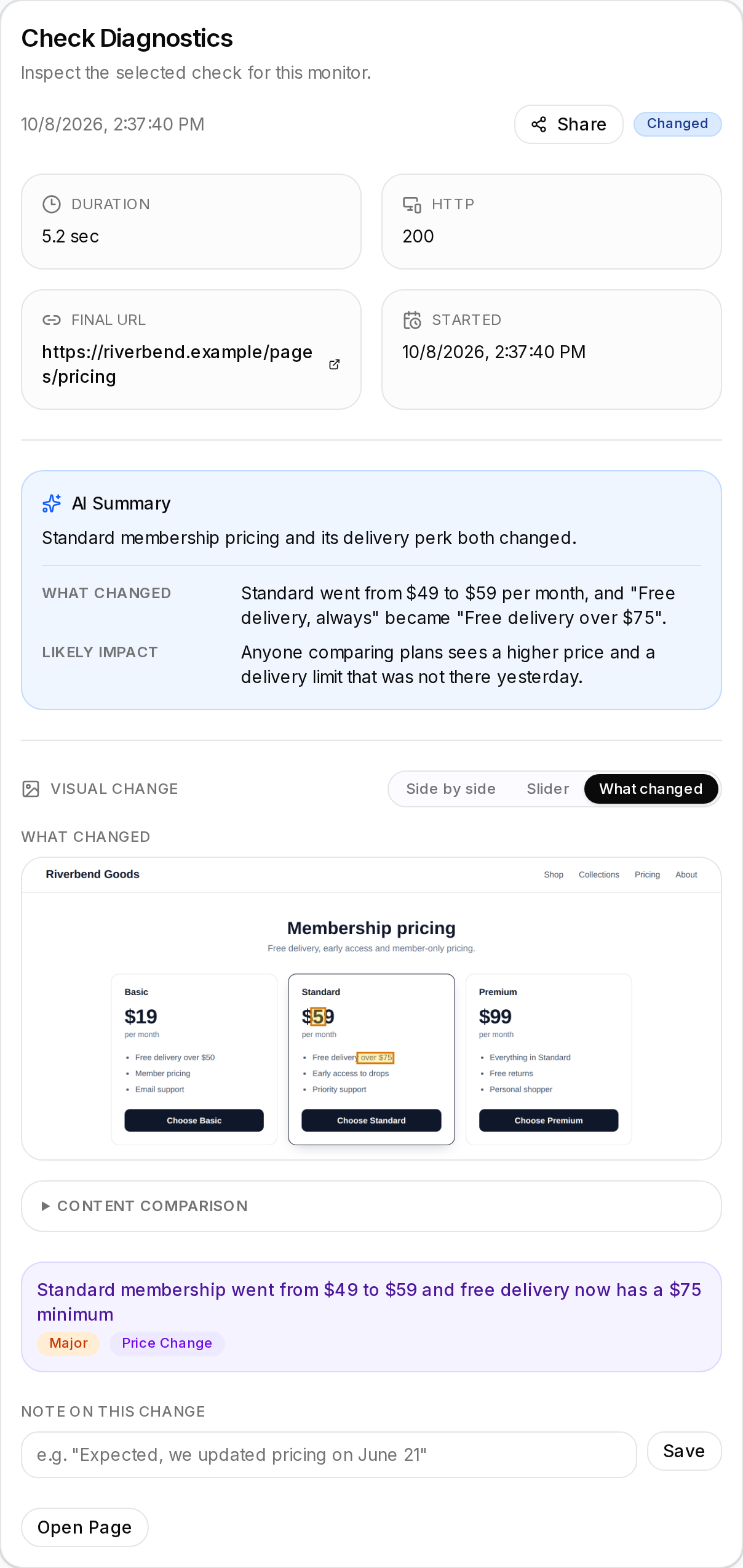
You can annotate a change from the check detail page (for instance "expected, we updated pricing") so the history stays meaningful.
Avoiding false positives
- Prefer Selected region over Full page, and pick a region that excludes ads, feeds, and clocks.
- Simrix Monitor hides common ad containers and dismisses cookie banners before capturing, but not every site uses standard markup. If a full-page monitor keeps flagging changes, switch it to a region.
- If the region includes something that legitimately changes often, move the region or use Fast (text only) so images don't count.
Frequency
Same options as workflow monitors. Most change monitors don't need to check faster than hourly; a policy page can happily check daily. See Billing and plans.