

An alert, exactly as it arrives
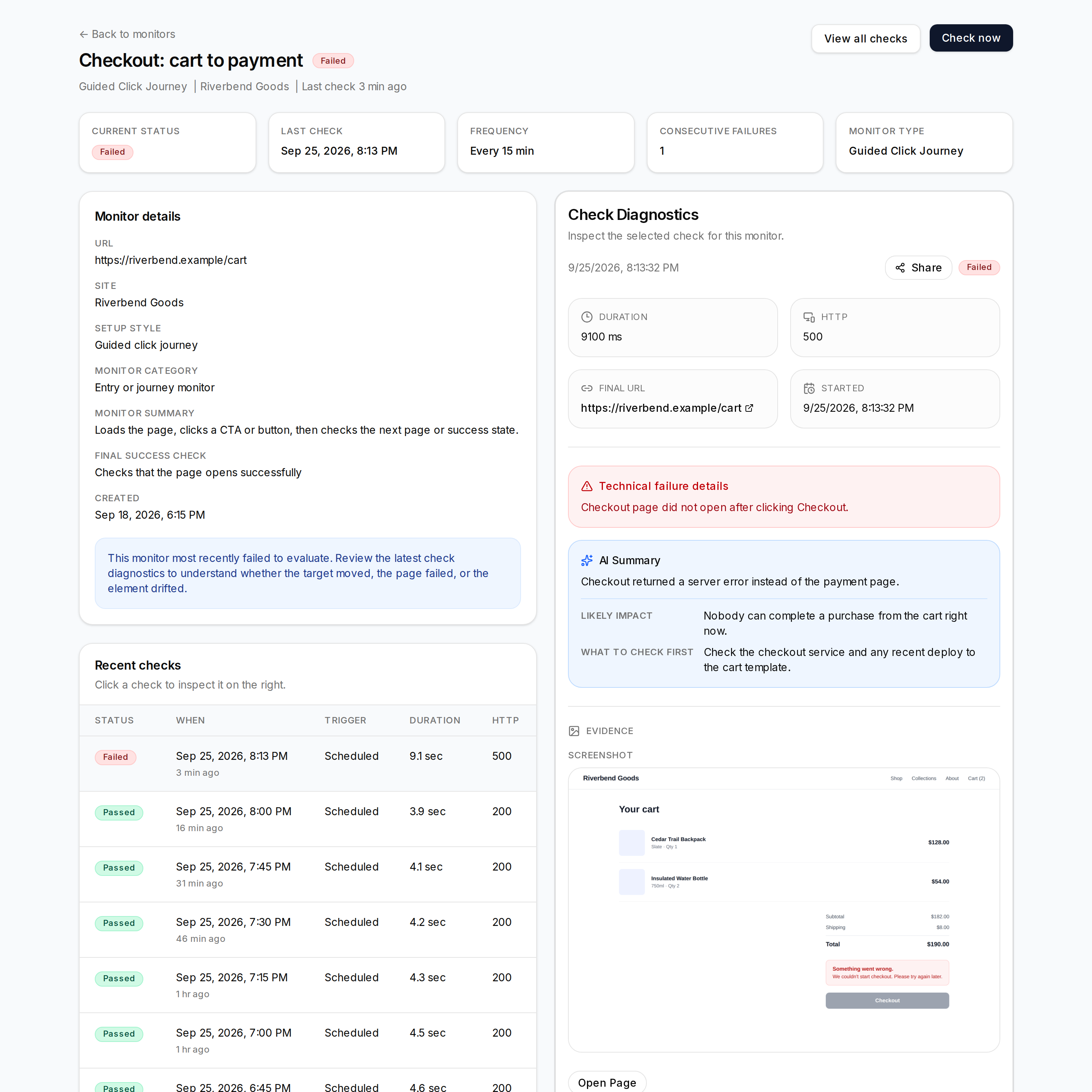
This is what you get when a check fails, taken from the demo store that ships with the product: the screenshot of the page at the moment it broke, the step the check stopped on, the address and status code it met, and a plain-English summary of what that means and where to look first. No dashboard to open; the evidence is in the alert.
What happened here
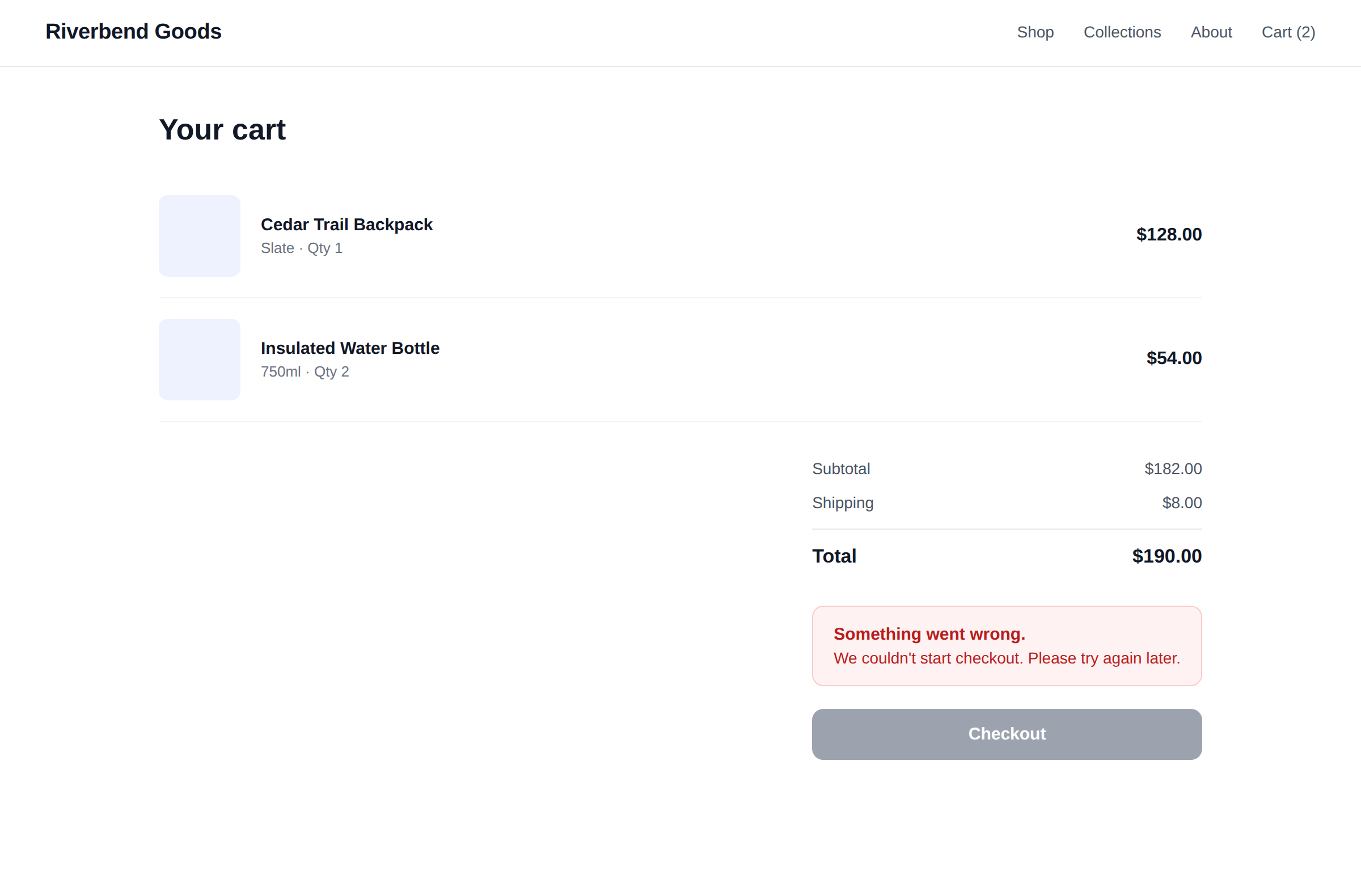
The monitor is called "Checkout: cart to payment". Every fifteen minutes it opens the demo store, adds a product, opens the cart and presses Checkout, and confirms the checkout page opens. At 8:13 PM the cart answered with a server error instead of the checkout page. The eight checks before it, every fifteen minutes back through the evening, had passed.
The alert went out within the minute, by email and to the Slack channel the workspace chose, with everything shown above attached.
What each part is for
- The screenshot settles the first question, "is it really broken?", without anyone opening the site. It is the page as the check saw it, taken at the moment the step failed.
- The step that failed says how far a customer gets: here, all the way to the cart, and no further.
- The address and the status code are what a developer or a hosting provider asks for first, so they are in the alert rather than in a follow-up.
- The plain-English summary says what the failure means for the business and what to check first. It is written by the product from the evidence, for whoever is on duty, and it is the one part a non-technical owner reads before deciding whether to make a call.
- The checks before it show when it last worked, which narrows the cause to whatever changed in the last fifteen minutes.
What happens next
The monitor keeps checking. When a later check passes, a second alert says so, with its own screenshot, so you know the fix held without going back to look. A monitor that fails and recovers between two checks is reported as both, not as nothing.
Try it on your own site
The free check does the same walk once, with no account: it opens your site in a real browser, follows the path to the cart or to your main form, and keeps a screenshot of every step. If a step fails you see exactly this kind of evidence for your own pages.
| Plan | Monitors | Fastest check | Sites | Per month |
|---|---|---|---|---|
| Free | 2 | 6 hr | 1 | Free |
| Starter | 10 | 30 min | 3 | $49 |
| Growth | 50 | 15 min | 10 | $149 |
| Pro | 150 | 5 min | 25 | $349 |
| Agency | 500 | 1 min | 75 | Talk to us |
Annual billing is 2 months free. See full pricing or start a 14-day free trial, no card required.
14 days, no card required.
Frequently asked questions
Is this a real customer's alert?
No. It is the product's own output for the demo store that ships with it, so that nothing on this site shows a customer's data. The report, the screenshot and the summary are exactly what a customer's alert carries.
Where do alerts arrive?
By email, in a Slack channel, or through a signed webhook to your own systems, and every one opens onto the report shown above. A daily summary and a weekly digest are there for people who want fewer messages.
Does a check have to fail completely to alert?
No. A change monitor alerts when a page's text or look changes beyond a small threshold, with a before and after instead of a failed step, so a silent price or template change reaches you too.
Last updated